An agent-based emergence simulation of a predator-prey ecosystem made in Unreal Engine 5 with C++ as my final project for CPSC 565: Emergent Computing class. This project was…
An agent-based emergence simulation of a predator-prey ecosystem made in Unreal Engine 5 with C++ as my final project for CPSC 565: Emergent Computing class. This project was completely planned, designed, and implemented by me. Notably, the creatures’ decisions are solely composed of information they can collect. In other words, there is no external data being transferred into the creatures; rather, the creatures are looking and listening to collect their own data. Here’s where the emergence comes in: all the creatures are relatively simple, but as a consequence of many of them acting together, more complex behaviors emerge.
This project aimed to see whether agent-based simulation could be used to create believable actors and assess the viability of using such a system in games and other simulations. The hope was that emergence-based behavior would prove to be a viable solution for making virtual worlds feel alive and not mechanical. The project was largely a success; however, further exploration needs to be done to assess the viability of such agents in virtual worlds beyond simulation.
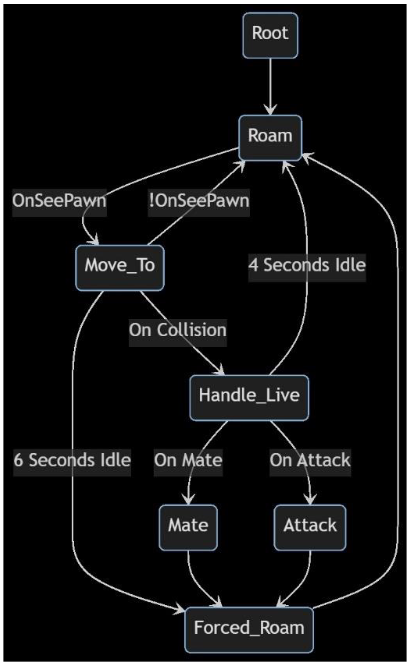
The project was made using Unreal Engine 5 and C++, and no blueprints were used. The StateTrees plugin was used to implement the creature AI.
Kingdom of Predators
Demo finished
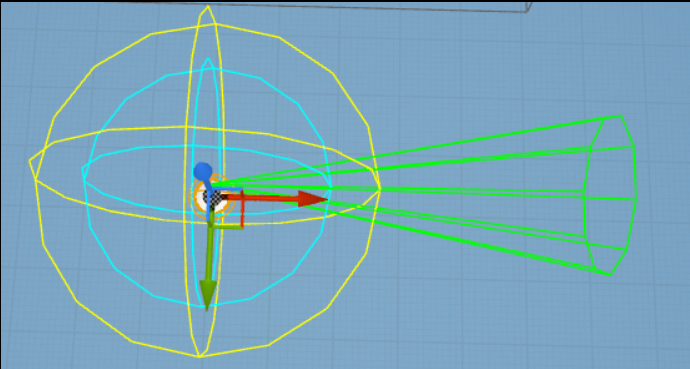
Kingdom of Predators creature screenshot
Kingdom of Predators state diagram
Code sample
// SAMPLE C++ CODE
// This is sample code from a animal/creature actor in a simulation made in Unreal Engine 5. Comments have been added to provide additional context regarding some objects.
// This code was entirely written by me, without the help of AI. It was written under significant time constraints as it was a small piece of a final project I worked on, I have decided to leave
// many parts of the code unchanged (except for the addition of comments), so that it is a more realisitic depiction of how I write code under tight time constraints. That having been said,
// looking back I would quite a few changes, which I would be happy to discuss.

void UData::TickComponent(float DeltaTime, ELevelTick TickType, FActorComponentTickFunction* ThisTickFunction) {
    Super::TickComponent(DeltaTime, TickType, ThisTickFunction);

    FVector OwnerLocation = Owner->GetActorLocation();
    FRotator OwnerRotation = Owner->GetActorRotation().Clamp();

    // directionArr is a small array corresponding to the direction that character is facing, whereas memory is a 360 sized array corresponding to all the directions the creature can face.
    int arrOffSet = OwnerRotation.Yaw;
    directionalArr = &memory[arrOffSet];

    // below code decays lastHit and energy variables over time.
    if (lastHit > 0) lastHit -= DeltaTime; // Added space after if

    if (energy > 0) {
        energy -= DeltaTime;
        if (energy <= 0) ProcessHit(attr_health);
    }

    UpdateHealth();

    // Raycast parameters
    FCollisionQueryParams TraceParams;
    TraceParams.AddIgnoredActor(Owner);
    FHitResult HitResult;

    // the creature shoots raycasts in a conal shape in the direction it is facing. Each i corresponds to a degree.
    for (int32 i = 0; i < directionalArrSize; i++) {
        TArray Hits;
        // this is used to know the direction of the raycast relative to the owner
        FVector Direction = OwnerRotation.RotateVector(std::get<1>(directionTuple[i]));

        // Perform the raycast
        if (GetWorld()->LineTraceMultiByObjectType(Hits, OwnerLocation, OwnerLocation + Direction * 1000.0f, PawnsAndCorpses, TraceParams)) {
            int sumOfHits = 0;
            for (auto Hit : Hits) {
                // check to see if a character was hit, if it was then we check cached information to see if we've computed owner creatures attraction to hit creature. If it's the first time hitting the creature, then we compute
                // attraction and store the value.
                if (Hit.GetActor()->GetName().Mid(0, 12) == "BP_Character") {
                    // Attempt to get the UData component from the hit actor
                    UData* HitDataComponent = Hit.GetActor()->FindComponentByClass<UData>();
                    if (HitDataComponent) // Check if the component exists
                    {
                        // Check cache using the component's ID
                        if (!IDMap.Contains(HitDataComponent->ID)) {
                            IDMap.Add(HitDataComponent->ID, CalcAttraction(Hit.GetActor()));
                        }

                        // Check the other actor's cache as well
                        if (!(HitDataComponent->IDMap.Contains(ID))) {
                            HitDataComponent->IDMap.Add(ID, CalcAttraction(Owner));
                        }
                    }
                }

                sumOfHits += gameObjectToAffinity(Hit.GetActor());
            }

            // this assigns an attraction value to a direction that the creature can move. The creatue will move in the direction of the highest attraction value.
            memory[(arrOffSet + i) % 360] = sumOfHits;

            // update highest if necessary
            if (sumOfHits > highestHit) {
                highestHit = sumOfHits;
                highestHitI = (arrOffSet + i) % 360;
            }

            // if we are debugging, if we hit something draw the raycast red, otherwise green
            if (seeDebugLines)DrawDebugLine(GetWorld(), OwnerLocation, OwnerLocation + Direction * 1000.0f, FColor::Red, false, 0.1f, 0, 1.0f);

        } else {
            if (seeDebugLines)DrawDebugLine(GetWorld(), OwnerLocation, OwnerLocation + Direction * 1000.0f, FColor::Green, false, 0.1f, 0, 1.0f);

        }
    }

    DecayMemory();

}